
Nationwide SmartRide®
NationwideAuto & Vehicles
4.4548.00 Reviews
- Version
- nwsmart-v4.4.0.0-98115-g88ef6c5-prod
- Installs
- 100.00K
- Age Rating
- Everyone
Screenshots
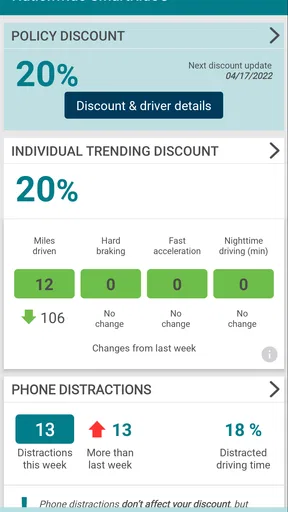
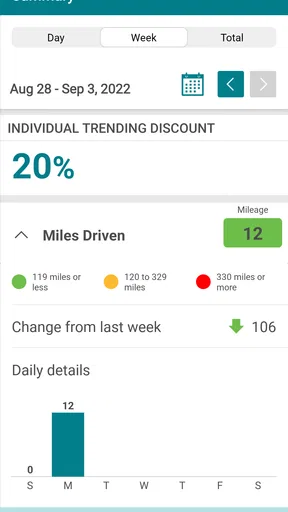
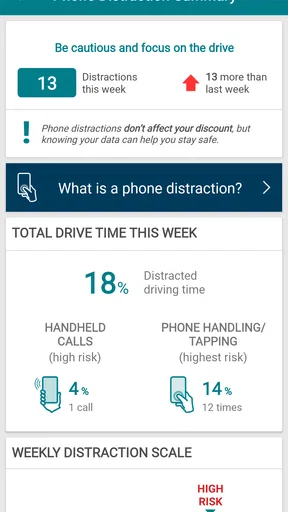
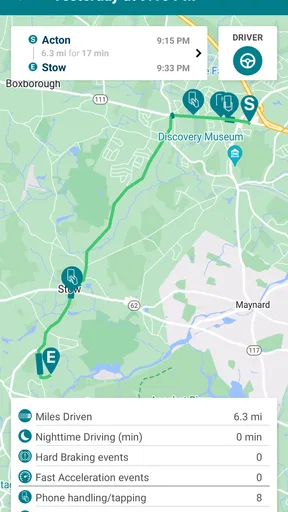
Our Review of Nationwide SmartRide®
 Analysis by Appyee
I look at Nationwide SmartRide® as a driving companion built around one specific idea: your everyday driving can help you save on auto insurance. That makes it quite different from a standard insurance app, where the main job is usually checking a policy, finding documents, or contacting support. Here, the interesting part is the connection between the app and your driving habits.
My first impression is that it is most useful for Nationwide customers who are comfortable allowing an app to observe driving-related behavior in exchange for a possible insurance benefit. It is free, rated for Everyone, and sits in the Auto & Vehicles category. Nationwide is the developer, and the app has reached over one hundred thousand installs with a 4.4 average from roughly one thousand ratings. Those figures suggest that it has found a clear audience, although they do not change the central question: are you willing to trade some driving data for the chance to reduce your insurance cost?
How Nationwide SmartRide® feels in everyday use
The app makes the most sense when I treat it as a background tool rather than something I open constantly. Its purpose is not to entertain me or replace a navigation app. Instead, it is intended to fit into normal driving, collect information about trips, and help Nationwide assess driving behavior through its SmartRide program.
That distinction matters. If you expect a full insurance-management hub with every account function in one place, this may feel narrow. If your main goal is to participate in a usage-based insurance program without installing a separate tracking device, the focused design is easier to understand.
A realistic example would be a commuter who drives to work most weekdays, leaves the phone in the vehicle, and wants a clearer way to demonstrate generally careful habits. The app can become part of that routine without requiring the driver to remember to start a session before every trip. The trade-off is that the phone needs to be handled consistently, and the driver has to be comfortable with the app interpreting driving activity rather than simply recording a mileage total.
The important decision is not whether the app is free; it is whether the potential insurance saving is worth the privacy and tracking trade-off for your own routine.
The current experience is deliberately focused
Nationwide SmartRide® is not trying to be a general-purpose road assistant. I would not install it expecting live traffic guidance, fuel-price comparisons, roadside tools, or the broad collection of policy controls found in some insurer apps. Its value is tied to the SmartRide experience itself.
That focus is helpful because the app’s reason for existing is easy to grasp. It also creates a limitation: people who are not interested in usage-based insurance may find little reason to keep it. A conventional insurer application may be a better fit if you mainly need digital ID cards, billing access, claims information, or policy changes.
The app requires a relatively recent mobile operating system, with Android 10 as the minimum. That is not an unusual requirement today, but it is worth checking before installing if you use an older phone. The current version is identified as nwsmart-v4.4.0.0-98115-g88ef6c5-prod, which tells me the product is being maintained as a production application rather than left as an abandoned experiment.
What the version information tells existing users
I would be careful not to read a version number as proof of a dramatic redesign. The current release identifier shows that the app has continued through several iterations, but it does not by itself promise a particular feature, interface change, or improvement in savings. That is an important distinction when deciding whether to update.
For an existing user, the practical expectation should be continuity with ongoing maintenance. Keep the application current, especially if the phone’s operating system changes or if trip detection becomes inconsistent. At the same time, do not assume that an update automatically changes how your insurance participation is evaluated. The app is only one part of the wider SmartRide arrangement, and the financial result depends on how Nationwide applies the program to your policy.
My advice is to judge an update by whether the basic workflow remains dependable: can the app recognize normal trips, show useful activity, and remain unobtrusive during the day? Those are more meaningful questions than whether the release label looks newer.
Where it can fit into a normal driving routine
The strongest use case is a driver with a stable pattern. Someone who drives familiar routes, keeps the phone charged, and wants to participate over an extended period will probably get more value than someone who drives only occasionally or changes vehicles and phones frequently.
Before relying on it, I would establish a simple routine. Keep the phone in a consistent place, avoid interacting with it while driving, and review the app only after parking. If the phone is regularly left in a bag in the back seat, shared between passengers, or used by several people in the same vehicle, the resulting activity may be less straightforward to interpret.
This is one of the less obvious trade-offs. A driving app can seem passive, but the quality of its results depends on the relationship between the phone, the vehicle, and the person behind the wheel. A household with several drivers should think carefully about whose phone is associated with which trips. A person who frequently rides as a passenger may also want to pay attention to how the app distinguishes travel situations in practice rather than assuming every movement will be classified perfectly.
Why the insurance context changes the evaluation
With an ordinary driving utility, a missed trip is mostly an inconvenience. With SmartRide, driving activity is connected to an insurance program, so reliability and clarity matter more. I would not treat a single confusing trip as proof that the app is unusable, but I would take repeated unexplained activity seriously and contact Nationwide through the appropriate support channel if it affects participation.
That is also why I would read the program’s terms before enrolling or continuing. The app’s store presence explains its purpose, but your policy documents and program conditions are the right place to understand eligibility, how participation works, and how any saving is applied. The app should support that process, not replace it.
Strengths that are easy to overlook
One strength is the low barrier to trying it. There is no purchase price, and the app is available to a broad audience under its Everyone content rating. That makes it easier for an eligible Nationwide customer to test whether the experience fits their habits before committing to a more complicated hardware-based approach.
Another strength is that the app connects the behavior being measured with the insurer offering the program. I do not have to move information manually from a separate driving tracker into an insurance account. That direct relationship is more convenient than keeping a mileage spreadsheet or using a generic telematics application that has no connection to my policy.
A third strength is behavioral awareness. Even without obsessing over every trip, participating can make me more conscious of how often I drive, how I handle routine journeys, and whether my phone habits create distractions. The app is not a substitute for safe driving, but it can reinforce the idea that smooth, attentive driving matters beyond avoiding an accident.
Where the experience can become frustrating
The biggest source of friction is the unavoidable data question. Some drivers will be perfectly comfortable with a telematics program; others will decide that no possible saving is worth having driving activity associated with an insurance service. Neither reaction is unreasonable. This is not simply a free utility with no consequences. Its purpose depends on collecting and using driving-related information within Nationwide’s program.
There is also a practical risk in assuming that every trip will be effortless. Phones have different battery conditions, background-activity settings, and sensor behavior. A driver who aggressively restricts background operation or frequently changes device settings may create a less reliable experience. I would avoid battery-saving changes that interfere with normal operation, but I would also keep an eye on battery use and phone warmth during the first part of participation.
Shared vehicles are another weak spot. If several household members drive the same car, the phone associated with each journey can complicate the picture. A family should agree on a consistent setup rather than installing the app casually on one phone and assuming it will represent everyone accurately.
The app is also not the right answer for someone seeking immediate insurance administration. If I need to update coverage, manage payments, retrieve documents, or handle a claim, I would choose the insurer’s broader account tools or contact support instead of expecting SmartRide to perform those tasks.
How it compares with the usual alternatives
The closest alternative is often doing nothing and accepting a conventional insurance arrangement. That option wins on simplicity and privacy because there is no driving-monitoring program to manage. SmartRide is more attractive when a driver is willing to share driving information and believes their habits may support a better insurance outcome.
Another alternative is a plug-in telematics device or a program built into the vehicle. Dedicated hardware can be appealing to people who do not want to use their personal phone for tracking. On the other hand, it introduces another object to install, maintain, or remember when changing cars. The phone-based approach is more convenient for many people, but it is also more dependent on the phone being present, configured correctly, and associated with the right driver.
Generic driving-score apps offer a different kind of value. They may provide more personal dashboards, coaching, or trip history, but they are not necessarily connected to Nationwide’s insurance process. If my goal is self-improvement, a dedicated driving coach could be more informative. If my goal is to participate in Nationwide SmartRide, the insurer’s own app is the more direct route.
Navigation apps are not real substitutes at all. They help me arrive somewhere; SmartRide is concerned with the driving behavior surrounding the journey. I would use navigation for directions and SmartRide for the insurance program, while keeping both safely in the background during a trip.
Practical steps before installing and during participation
I would begin by confirming that my Nationwide policy and location are eligible for the SmartRide program, then read the enrollment information carefully. The app can be free while the insurance arrangement still has rules, time frames, and conditions that matter. Understanding those details first prevents disappointment later.
Next, I would install it on the phone I actually carry when driving. Using a rarely carried spare phone defeats the purpose and can produce a misleading picture of normal travel. I would also make sure the device has enough charge for a typical day and that I am not constantly force-closing the app or blocking its background activity.
During the first few journeys, I would review the recorded activity only after parking. This is a useful diagnostic step rather than an invitation to check the phone on the road. If a trip looks unusual, I would note the circumstances: was I a passenger, was someone else using the car, or was the phone somewhere unexpected? That context helps me decide whether the issue is occasional or part of a recurring setup problem.
One advanced but practical habit is to separate app troubleshooting from driving criticism. If a trip is represented unexpectedly, first check the phone arrangement and household usage before assuming the driving itself was judged unfairly. This keeps the response calm and gives Nationwide more useful information if support is needed.
Who should use it, and who should skip it
I would recommend giving it serious consideration to a Nationwide customer who drives regularly, wants to explore usage-based insurance, and accepts that participation involves sharing driving-related information. It is especially sensible for someone with one primary phone, a fairly predictable vehicle routine, and the patience to let the program build a meaningful picture rather than judging it after one journey.
I would be more cautious if you drive several vehicles, share one car among many people, frequently ride as a passenger, or often leave your phone behind. Those situations do not automatically make the app unsuitable, but they increase the need for careful setup and review.
I would skip it if your priority is avoiding telematics altogether. I would also choose a broader Nationwide account solution if your immediate need is policy administration rather than participation in SmartRide. The app’s narrow purpose is a benefit for the right user, not a flaw to be ignored by someone seeking a complete insurance toolbox.
What I would watch as the product evolves
The current release deserves attention in three areas. First, I would watch whether trip recognition remains dependable across different phones and ordinary household driving patterns. Second, I would look for clearer explanations when activity is recorded unexpectedly, because transparency is particularly important when insurance decisions are involved. Third, I would value improvements that reduce battery impact and make it easier to understand participation without turning the app into a cluttered dashboard.
I would also watch how well the experience serves existing users after phone upgrades, vehicle changes, or policy changes. A mature telematics app should make those transitions understandable. It should be obvious what needs to be reconfigured and what remains connected to the account.
Those are expectations, not promises about a particular future release. The current version shows continued product maintenance, but I would evaluate future changes by their practical effect on trust and reliability rather than by new labels alone.
My final take
Nationwide SmartRide® is a focused Auto & Vehicles app with a clear purpose: it supports Nationwide’s usage-based insurance experience by bringing driving activity into the phone I already carry. I like that it avoids the need for a separate tracking device and that its free installation makes exploration straightforward.
Still, I would not describe it as a universal must-have. Its value depends on eligibility, driving habits, household setup, and comfort with telematics. The app is strongest for a consistent driver who wants to investigate potential insurance savings and is prepared to maintain a sensible phone routine. It is weaker for someone who wants a full insurance account manager, dislikes tracking, or regularly switches between vehicles and drivers.
With an average rating of 4.4, more than one hundred thousand installs, and a current production build, it has enough presence to be taken seriously. My recommendation is practical rather than absolute: read the SmartRide conditions, use the phone you actually carry, review activity only when parked, and judge the program by whether its potential benefit feels worthwhile alongside the privacy and setup trade-offs. If that balance works for you, this is a useful, purpose-built addition to a Nationwide policy. If it does not, a conventional insurance experience will probably feel simpler and more comfortable.
Verdict
Strengths of Nationwide SmartRide®
- Tracks trips and driving behavior in one convenient mobile dashboard.
- Can help users identify habits that may improve fuel efficiency.
- Useful for monitoring vehicle use across multiple trips.
- Provides a digital alternative to keeping manual driving records.
- May support safer driving awareness through trip feedback.
Limitations of Nationwide SmartRide®
- Requires compatible vehicle data or setup for full functionality.
- Continuous location access may affect battery life and privacy.
- Driving scores can be influenced by GPS or sensor inaccuracies.
- Some features may depend on an active Nationwide policy.
- Limited usefulness for users who rarely drive or share vehicle data.
Similar Picks in This Category
View All
Android Auto
Google LLC4.1

maxim — order a taxi & food
PT. SITO4.7

Штрафы ГИБДД: проверка с фото
Pays LLC – Штрафы ГИБДД4.7

Номерограм – проверка авто
Авто Ассист4.8

Дром Авто
Дром4.9

Frequently Asked Questions
What is Nationwide SmartRide® and how does it work?
Nationwide SmartRide® is a usage-based insurance program that evaluates driving habits through a mobile app or another approved tracking method. After enrollment, the service may record information such as mileage, braking, acceleration, time of day, and driving patterns. This data is used to provide feedback and may help determine an insurance discount, depending on your state, policy, eligibility, and participation terms.
What permissions does the Nationwide SmartRide® app require?
The app generally needs permissions related to motion, location, and smartphone activity so it can identify trips and evaluate driving behavior. Depending on your device and program setup, it may use background location access, Bluetooth, notifications, and motion sensors. Before accepting, review the permission explanations carefully. You can change permissions later, although limiting access may affect trip detection or program results.
Does Nationwide SmartRide® track every trip and everyone in the vehicle?
SmartRide® is designed to identify and evaluate driving trips associated with participating drivers, but automatic detection is not always perfect. The app may occasionally need you to confirm whether a trip was made by you or someone else. Passengers should not be treated as drivers, and you should review trips regularly to correct mistakes. Accurate identification is important because recorded data can influence program feedback or discount calculations.
Can Nationwide SmartRide® lower my insurance premium, and can my rate increase?
The program is primarily intended to help eligible customers qualify for a potential insurance discount by demonstrating safer driving habits. The exact savings, qualification rules, enrollment period, and treatment of driving data vary by state and policy. In many situations the program is marketed as discount-focused, but you should read your enrollment documents carefully because program terms and renewal effects may differ. Do not assume a discount is guaranteed before completing the required participation period.
Is Nationwide SmartRide® safe to use while driving?
The app should be set up before starting a trip and used without interacting with the phone while the vehicle is moving. Its purpose is to run in the background and collect driving information, not to encourage manual operation on the road. Check that permissions, battery settings, and phone placement are configured in advance. If you need to review a trip or change a setting, park safely first and follow all local distracted-driving laws.
